Introduction
Welcome
to this second edition of Mr Nick's Cracking Guides. Thank you to all who read
and reponded to the first.
This
tutorial will delve a little deeper into cracking. Instead of basic hunting out
a call to error box, this time we will find where the original call to the
registration procedure is, and then look through this to find out what it does,
how it generates your registration code, and then hopefully patch it, so it
doesn't call the error screen.
I
have obviously noticed that Qualpa has used this for his tutorial, but he took
the softice approach to find the serial number generated for the entered name.
I will be looking at it from the W32Dasm point of view, and then patch the
program so any reg name and code can be entered.
You
will also notice something different in this tutorial, I am going to take this
as if you were doing the job, no jumping to the conclusions in here, everything
that I used to deduce what was going on will be in this guide.
Tools
for the job
For
this job you are going to need the following tools :-
W32Dasm
8.7 + - Top notch decompiler.
PSEdit
- Easy to use hexeditor
Let's
Go
I
am going to divide this tutorial up into the following sections, to make things
more understandable, and people can refer to the tutorial easier.
If
you have been through the first cracking guide, you can skip to section 5 which
takes you beyond the items covered in tutorial 1 otherwise please read on.
Part
1 :Examining the Program.
Before
you attempt to crack a program have a good look around it first. Obviously
first step would be to load the program up.
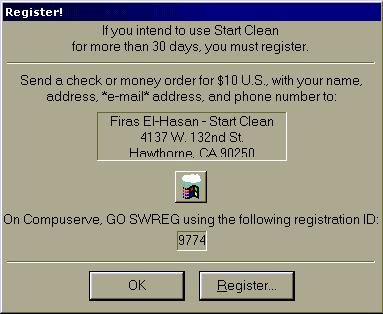
This
screen is presented to you everytime you loadup the program and it is
unregistered. It mentions that you have 30 days of use of the program before it
expires, this could be one way to get at it.
Ok,
next step is to click on that Register button see where that takes us.....
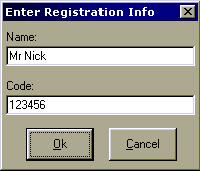
Pretty
simple stuff, so once this stuff has been entered, you then click OK, and yep a
little box comes up saying that the code is incorrect. What a suprise. Well at
least a message comes up, when I write my programs, I make sure a message
doesn't appear as this is a easy area to attack.
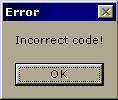
OK
lets slip into the program, see what we can find of use in there.
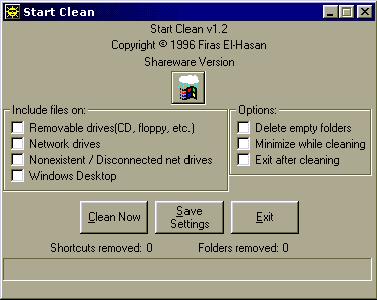
As
we can see at the top, there's the name of the program, and underneath there is
'Shareware Version' so there is another area we could attack it, why ? well it
is obvious that when you register this program that will be a part of the
program that will change, it will either go away, or be replaced by your name.
So
there it is, that is all there is too the program. Here is what we can assume
from what we have seen.
*
The program will expire after 30 days.
*
When a user enters a incorrect code, it will produce an error message.
*
Shareware version appears on the main screen.
Part
2 : Making an attempt to crack
OK,
from the information above, the best approach would be to take a look for a
call to the incorrect code in the program. To do this we use a program called
W32Dasm, which decompiles (takes to bits) the program and presents the
information in assembly language. This means anyone with a small understanding
of assembly language can see roughly what's happening.
So,
loadup W32Dasm and you will be presented with a big grey screen, what you now
need to do is open up the startcln.exe file. Using the button as below.

Easy,
now locate the startcln.exe file and open in.
(If
you receive a screen full of garbage refer to the appendix section)
OK,
so now you have a screen full of assembly language and other information,
feeling lost... yeah so am I , BUT you don't need to understand half of this,
if would better if you did, but let's see.

The
next step is to click on a button on the toolbar marked Strn Ref. This refers
to the String References. String References are areas of the code that refer to
strings that are called in the program, and what we are looking for might be
there.
Using
the scroll bars, move down the box full of strings until you get to what might
look like 'Incorrect Code'.

OK,
there it is, the incorrect code message. Now all you need to do is click this
twice to locate it within the code, and you should get to the location below.
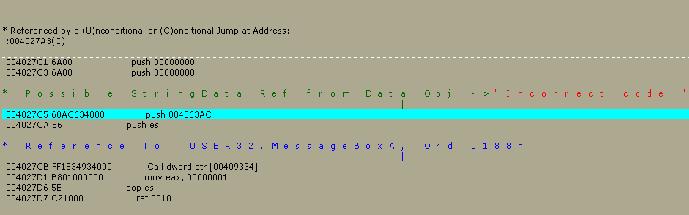
OK,
let me explain this a little bit.
What
you have here is a section of code where the string Incorrect Code is used, this
is the part of the program where the message box pops up with the message
incorrect code. So you can assume that this has been called from where the
registration process is going on, and it has been called because an incorrect
code has been entered.
This
is starting to make sense now, but where was it called from. The next part of
the clue is just above the incorrect code string.

This
section of the code shows where the message was generated, or sent from. So all
we have to do now is scroll up to 004027A3 and see what we have there.
And
this is what we get.
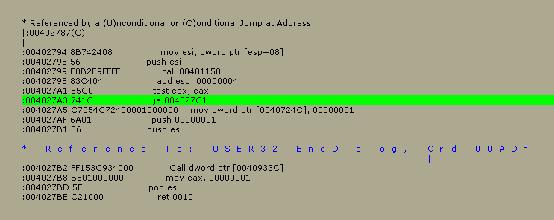
OK,
nearly done, next step is to find out the hex location of this line so we can
do some patching. This is quite straightforward, just look down the bottom of
the screen and you will see the following.

OK,
so what we now see is the location is at 00001BA3. Notice there is an h
after this code, this means that the code is in hex format, so you don’t need
this.
Part
3 : Patching the Program
OK,
so are we nearly done yet, we will have to see. The next step involves changing
the code located at the said point so that it doesn’t go ahead and show the
incorrect code screen.
A
simple replacing the 741C with 9090 would do the trick. All this
does is replace the jump with 2 NOP commands, which the program just
ignores, so hopefully it will carry on like it has been registered.
Loadup PSEdit and open the startcln.exe file. You will be presented with the
following screen.
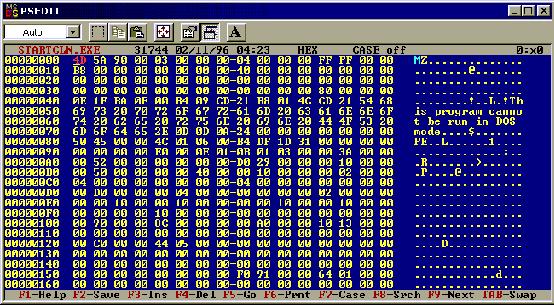
Now
what we have here is a hexidecimal represntation of the program. Instead of all
the JNE, EAX and all that, you are presented with a massive list of hex
numbers. What we need to do is look for the line located above.
Press
F5 and a box will popup down the bottom of the screen and enter the code
location as below.
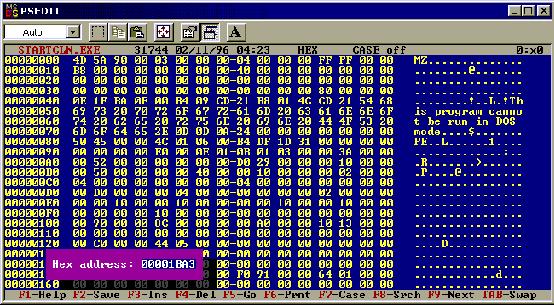
Once
that has been entered, just press return or enter and it will take you to that
location and highlight the approriate piece of code.
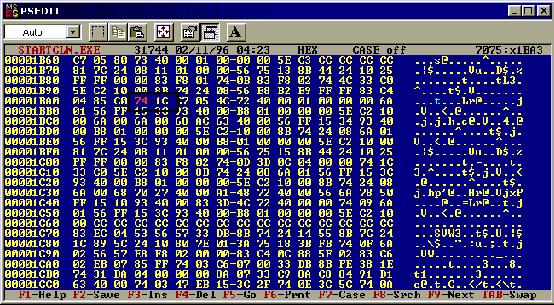
As
you can see, with the box around it, there is the code 741C that we need
to change, all that we need to do now is change it, by just typing over it, and
then save.
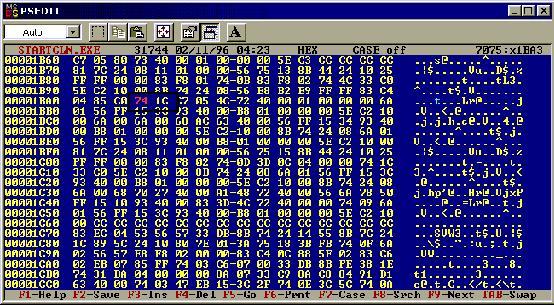
Let’s
go see if our patching has worked.
Part
4 – Checking the program again.
OK,
so lets load up the program, go to the registration screen and enter the
details..
No
error message, it looks like it could have worked. BUT what’s that I see on the
main screen, it has changed the shareware version message to Registered to but
hasn’t put your name there. Slightly odd.
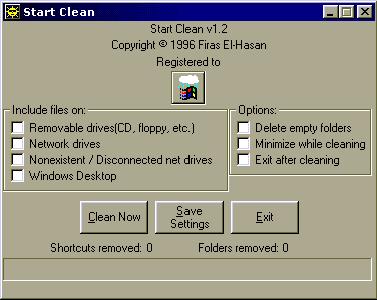
Let’s
do a quick test to see if the program has really registered or not. Restart the
program.
Oh
no.. the program has brought back a familiar screen. It seems that the program
didn’t register after all, but all that happened was that you stopped the error
message being produced.
What
can we do now ??
Let’s
dig deeper and see what we can find. This is where this tutorial takes you a
little bit further than the first.
Part
5 - Digging Deeper
Let’s
slip back into W32Dasm, and see what we can see around the area we patched, I
still left W32Dasm open when I patched startclean, so the code is still
unchanged.
Here
is our screen again, what can we look for.
OK,
let’s take this line at a time, starting at the jump and work our way upwards
(or backwards).
1st
Line Up – This is testing two flags, which then goes on to jump if equal to our
incorrect code location.
2nd
Line Up – This is adding 00000004 to the esp register
3rd
Line Up – This is calling an address.
OK,
so we stop at the call, obviously the program is calling a procedure such as a
registration procudure, it then comes back from this with some registers set
and checks these, if they are equal it will jump to the incorrect code box to
tell the user they have the wrong code. This definitaly looks like the write
path to follow.
So
lets..
Click
on the Call Button on the toolbar as shown below.

This
will take us to a large section of code.
Now
time to look for some clues as to what is going on here, and work out whether
this is the correct section.
Scrolling
down the screen slowly, we can point out various strings which prove that this
is indeed the area we need to be in.
For
example –
There
are various calls to the Registry Office and registry keys
There
is the GetDlgItemTexta which is used to retrieve data from a text box, such as
the registration code input screen.
There
is the lstrcmpa function which is used to compare two strings.
..and
further on down there is the words NAME and CODE.
OK,
so this is our section, but there is so much here what do we look for.
This
is where we need to use our brain and think, this where a little knowledge of
assembly or programming comes into play. With all the clues above, what can we
deduce.
It
reads in the data with the getdlgitemtexta command, and then compares something
with perhaps another item in memory using the lstrcmpa function.
Let’s
check out around the compare function, because obviously when it has compared
it is going to do something. Here is what we see.
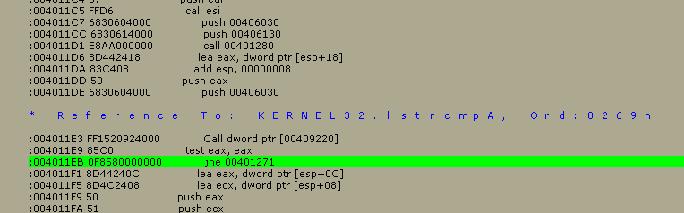
Below
the blue line, there are three relevant lines. The first I am taking a guess
at, this points to a code in memory, for example the code that is generated
from your name.
The
second line is testing if the code you entered and this code is equal.
The
third line is then jumping to location 00401271 if the two codes are not equal.
So,
this is definatly the section we won’t to be playing with. Let’s do some more
investigating.
Let’s
just see where this takes us, and perhaps what it does.
Click
on the button marked jmp on the toolbar as shown below.

This
will take us to the following area of the code.

This
is the section where the code jumps if the codes don’t match each other. What
is going on in this section.
Well,
to tell you the truth, I don’t know exactly what is going on, but some of the
registers are being changed, which will obviously be checked later on. We don’t
want this to happen, so common sense tells us that all we have left to do is
make sure the program doesn’t take us near this area of code and it should
thing it’s registered.
First
things first, lets go back to where we came from, and we do this by clicking on
the RET button on the toolbar as so.

We
are back to the call. Now all we have to do is block this call by again NOPing
out the code 0F8580000000 which is going to look like 909090909090.
Part
6 – Final Patchwork
Hopefully,
this is going to be the final patching you do on this so, again loadup the file
in PSEdit and locate the code that is presented at the bottom of W32Dasm (don’t
know how, then check above).
You
will see the line 0F8580000000, just overtype all this so it ends up
like this..
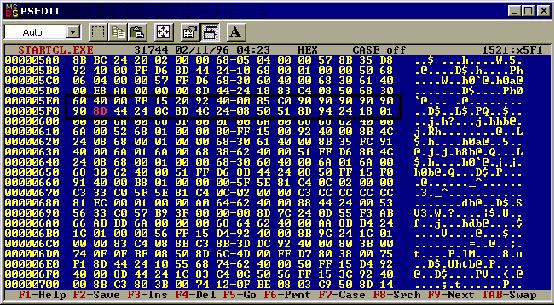
You
can see all those 90’s inside the box. Don’t forget the one that you have to
enter on the next line.
Ok,save that and then run the program, let’s see if THIS has done the job.
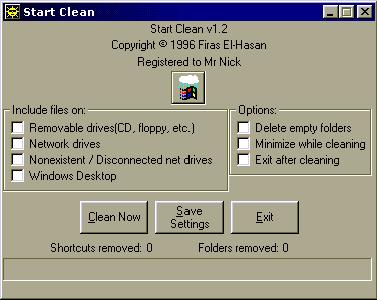
OH
MY GOD, it looks like it has worked. Just to check close the program, then load
it up again. YES, YES it has been registered.
Part
7 – Final Words
OK,
so you learnt in the first tutorial how to patch a program, by cancelling the
jump, and in this tutorial you took that a bit further by digging a bit deeper.
I hope this has helped you in your knowledge to learn how to crack, look out
for more tutorials in the series.
MR NICK
Disclaimer.
This
guide is for educational purposes only, and I do not encourage any illegal form
of activities against shareware products, or indeed any software. If there is
anything in here anyone feels is objectional, then if I am contacted by e-mail
I will with good reason withdraw that said content from this guide.
|