
Home Page
PROGRESS TOOLS
WinPL
PL Plugin for TC
RCode Checker
RCode Info
Procedure Explorer
Progress Obfuscator
XCode Recovery
Piew
DB Dumper
Progress Decompiler
Encode Cracker
RCode Spy
OTHER PROJECTS
P32Dasm Decompiler
DARKER's Enabler
ORACLE DeWrap
XorTool
HexComp
File Mapper
Task Logger
Alarm Clock
Version Checker
Kramos
File Tractor
Xlat Table for Hiew
VB6 DataEnv. Parser
Links
CONTACT
Allways check main site! http://progress-tools.x10.mx/
PROGRESS Editor & Source Code Viewer
Description:
Piew is free PROGRESS editor and source code viewer for Windows with some basic and
additional features that support syntax highlighting. Why another editor? Sometime you
don't want load whole PROGRESS environment just for small change, for source viewing or maybe you
want use some features that are not available in basic PROGRESS editor.
Features:
- basic editor functions
- tabbed interface (multiple opened files at one time)
- syntax highlighting (comments, numbers, keywords, strings)
- highlight occurrence of double-clicked word or define your own string in document
- auto case keywords (lower, UPPER, Title)
- auto complete
- annotations inside editor
- insert Timestamp, Filename, File contents, Defined text (e.g. headers)
- drag & drop text editing
- write protected mode (to avoid accidental overwrite)
- basic regular expression search and replace
- find next/previous word under cursor (without search dialog)
- useful word, line and block editing shortcuts
- rectangular selection (Alt+Mouse)
- zoom functions
- (un)indenting
- (un)commenting
- auto indent
- source beautify (auto indenting blocks)
- you can automatically remove comments from source code
- you can automatically remove empty lines from source code
- auto case source (if was written with no case)
- align DEFINE VARIABLE, ASSIGN lines (beautify)
- check syntax and run source in PROGRESS environment
- bookmarks
- export source as HTML
- color (syntax highlighting) or BW printing
- show line numbers
- show whitespace
- always on top
- if you have selected some word, you can press F1 to call PROGRESS internal help from this editor. (You must define path to PROGRESS help files lgrfeng.hlp or lgrfeng.chm)
- supports Unix (LF), Windows (CRLF) or Mac (CR) line endings
- restore last opened files on start
- open selected string as new file (searching in Propath)
- option to open files in "Write protected mode"
- Code explorer - fast navigation through Procedures, Functions, Triggers, Temp-Tables tree
- Long line marker
- Aliases (Abbreviations)
- Outside changes detection
- Brace highlighting
- UTF-8 encoding support
- full screen editing
Read more in Readme.txt !
Screen Shot:
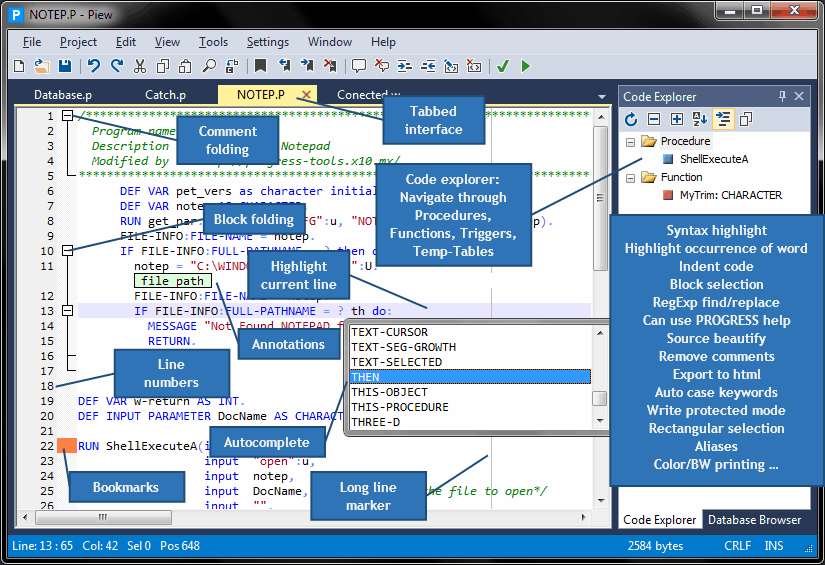
Click here to download.
Current version 3.60 (16.04.2012)
What's new:
Added:
Possibility change charset from more types (problem with displaying Russian text written in code page 866)
Possibility open files with Ctrl + Mouse click used in code
Some shortcuts: Check syntax, Run and Bookmarks
New replace parameter in check syntax and run command: %3 - replaces to checked PROPATHS in settings
Changed:
Brackets highlighting now only occur when the cursor is before the bracket
Go to a line (ctrl-G) now focus the line in center of viewing area
Removed function prototypes that "steal" space from code explorer
Syntax.p and run.p, read more inside (update your saved commandline if you use it!)
Download old version 2.9 (22.05.2010)
This is .OCX version. You don't need Microsoft Framework for run. This version will be no longer supported.
| ||||||