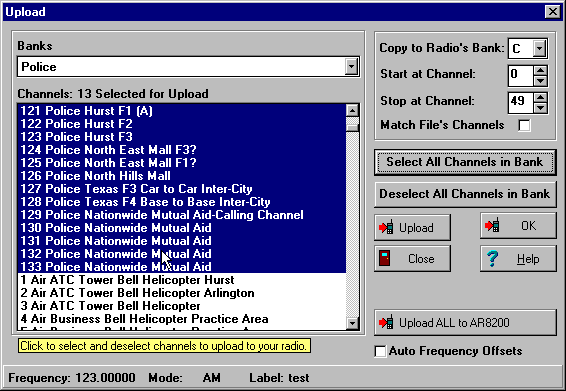
Some new scanners are computer programmable,
computer controllable, or both. Some can be modified to be computer
programmable and/or controllable. In any case, using your computer
to enhance your scanning is a great deal. What follows is a better
explanation of the differences of computer capable scanners and
what all of the fuss is about.
With a computer programmable scanner you can use your computer to store, organize, share, dynamically switch scanner profiles for events, traveling, and more! Or more simply, you can program the scanner's channels by computer (upload) as well as by hand.
Let's say you normally have your scanner loaded to the max, or more realistically, you've got something important in every bank. That might include everyday routine police, fire, media, aviation, and traffic frequencies. Now, the big event comes to town, say the inaugural Texas Motor Speedway Winston Cup NASCAR race. UGH! With an ordinary scanner that means you'll be programming racing specific frequencies on the tiny keypad of the scanner for a long time before the race, and when the race is over, you guessed it, more typing to get your scanner back to its everyday configuration. (Wow, this is starting to sound like an infomercial! I guess it really is.) Ahh!, but you have a computer programmable scanner like Radio Shack Pro-64 or Pro-2041, a computer, an interface, and Radio Manager for Windows. All you have to do is store your frequencies in Radio Manager for Windows once. Then you can quickly and easily upload the "channels of the day" to your computer programmable scanner in a matter of minutes, or even less. If you've been using Frequency Manager for Windows, then the work will be even less, because Radio Manager can create bank files from your Frequency Manager list automatically.
If you travel, go to air shows, auto races,
ham-fests, airport watching, from Fort Worth to Dallas, or just
want to share your channels with a friend, a computer programmable
scanner with Radio Manager for Windows will make scanning even
more fun.
There are varying levels of computer programmability.
For some scanners you can only upload the very basics like frequency
and mode, while others allow you to upload more extensive channel
information like delays, alpha tags, select channels, step size,
attenuation settings, and more. Some scanners even feature downloading,
so that you can copy the scanner's contents into your computer!
That makes a handy back up system.
With computer controllable scanners, software can take control of the receiver circuitry to tune the scanner for scanning, searching, logging, etc. Under software control, the scanner is no longer limited by it's channel capacity, because the software on your computer handles memory management, effectively making a "virtual scanner" in your computer. In this circumstance, the computer scans through the frequencies in it's memory, rather than the scanner scanning through it's own channels. Obviously that's going to open up a whole new way of looking at things. You'll be able to store virtually unlimited numbers of banks and channels, even in separate files, so that with a few clicks of the mouse, you can quickly be scanning totally different frequencies, and best of all, you didn't have to press the Program key, enter a frequency, and press Enter, repeatedly for possibly hundreds of frequencies! Granted, you would have to initially program your software's frequencies, but once that's done (on a full-size keyboard, I might add), you can save it, and not have to retype those frequencies again.
I call sitting at your computer and controlling the scanner by computer "interactive" scanning or searching. It's a lot easier to sit and watch a computer screen with text descriptions of banks and channels using a mouse and full-size key board than doing the same without descriptions on a tiny and awkward scanner keypad.
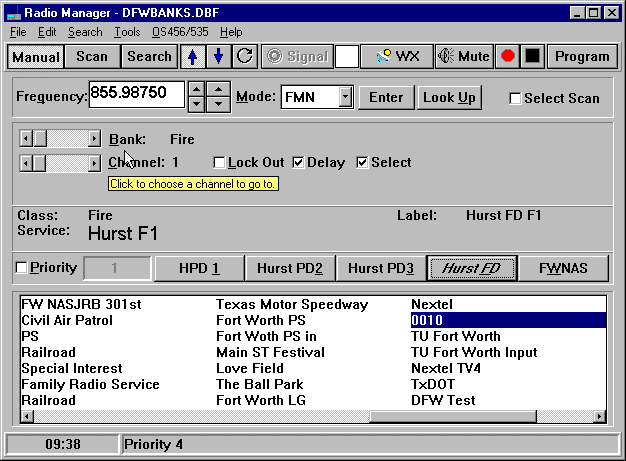
Another popular use for computer controllable scanners is logging. Computer software can log active frequencies that are found while searching and scanning. It's a great way to verify frequencies, find new ones, find inactive ones, and more. Typically, while logging, active frequencies are stored in a file with the date and time of the "hit", mode, and in some cases DTMF digits that were transmitted, CTCSS & DCS tones, signal strength, and even a description of the frequency. I have found hundreds of new frequencies using this method. Since my scanning time is limited, I can set up my computer software and scanner to log while I'm away from the system at work, asleep, or anywhere else. When I have time, I look at the log to see what treasures have been found.

Software like, Radio Manager for Windows, also offers many features usually not available in scanners.
Some of the above may be limited by the scanner's capabilities.
Some scanners are better for computer control than others due to squelch detection methods, tuning speed, and shielding from computer interference. Please see the chart below for some guidelines in choosing a computer capable scanner.
Here are some of the scanners that Radio Manager supports. Some are better suited to computer programmable functions, while others are great for control, one or two are good at both control and programming. In general, the handheld scanners are usually limited to upload and downloading for practical purposes. An asterisk (*) indicates that the scanner supports the function described.
| Scanner | Upload | Download | Control |
| Radio Shack Pro-64 | * | ||
| Radio Shack Pro-2041 | * | ||
| OptoElectronics OptoScan456/535 with Radio Shack Pro-2005/2006/2035/2042 | * (My favorite for logging and interactive use) | ||
| OptoElectronics OptoCom | * | * | * (has built-in CTCSS/DCS and DTMF Decoder) |
| Uniden Bearcat 245XLT
Even Includes Interface Cable | * | * | *!!!Best All Around Value!!! |
| Uniden Bearcat 895XLT | * | * | * (Great for interactive and logging TrunkTracking) (probably best value) |
| AOR AR8200 | * | * | a |
| AOR AR8000 | * | * | a,b |
| AOR AR2700 | * | * | a,b |
| Icom R7000/R7100/R9000 | * | * | * |
| Icom PCR1000 | * | ||
| Icom Others | Vary | Vary | Vary |
a - control functions are supported, but not very fast because there is not a good hardware squelch detection method.
b - control functions are supported, but not
very good because the radio and interface are very prone to interference
from the computer.
Return to Radio Manager home page. Copyright © 1998-1999 Ben Saladino, KC5IRJ