
Radio Manager for Windows Home
Page
[Downloads]
[Upgrades] [Features]
[Screen Shots] [Register]
[Computer Scanning] [Version History]
[Tips] [FAQS]
[Printable Manuals][Interfaces]
[Bugs] [Home] [Trunk Manager]
[Frequency Manager] [Other Shareware Products]
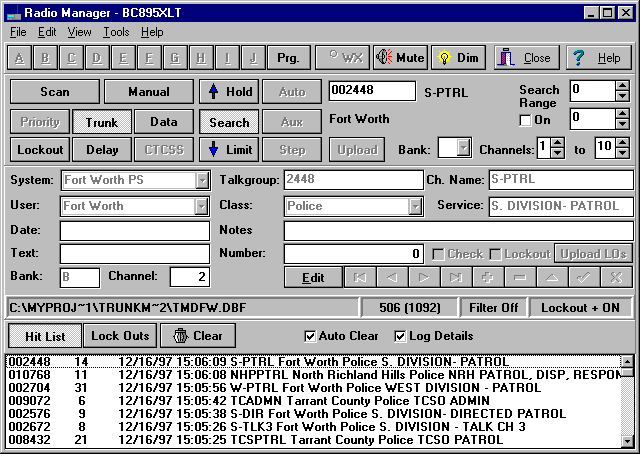
Support for the Uniden Bearcat BC245XLT
& BC895XLT featuring…
- Virtual Key Pads
- Hit List for quickly returning to an ID
- CTRL+Click a Bank Button to Switch to TrunkTracking
that Bank (245 Only)
- Preferred Scan Banks Function (245 Only)
- AutoContinue for better Logging of IDs
- Display Alias/Channel Names in Color
- ID Lockout List for displaying all Locked
Out IDs in a trunk bank. (895 Only)
- ID Lockout+ for Automatically Locking Out
IDs marked as such in Look-up database
- ID Lockout Upload and Downloading
- Channel Names in TrunkTracking Mode
- Upload and Download TrunkTracking ScanLists
- Size Code Helper to help nail down Fleet
Maps.
- Display AFS and Decimal formats for EDACS
IDs (245 Only)
- Search Range - Automatically Skips over
TrunkTracking IDs not within the range you define.
- ID Filter - Automatically Skips over IDs
that don't match the Filter You've Defined
- ID Alarms with up to 3 different Sounds
- Upload Channels(Including Trunk Programming
Mode)
- Download Channels
- And almost all of the other existing Radio
Manager for Windows features
- The BC245XLT Virtual Key Pad is similar
to the BC895XLT's shown below
Size Code Helper - Makes figuring out
Fleet Maps for Type I and Type I/II systems manageable. Active
Type II IDs are displayed as they would appear if set to size
codes 0 through 12.

[Downloads]
[Upgrades] [Features]
[Screen Shots] [Register]
[Computer Scanning] [Version History]
[Tips] [FAQS]
[Printable Manuals][Interfaces]
[Bugs] [Home] [Trunk Manager]
[Frequency Manager] [Other Shareware Products]
Copyright © 1992-1999
Ben Saladino KC5IRJ